
Animate One Image
Your picture becomes the first frame and the clip keeps its shape. Describe what moves and where the camera goes.
Input

Result
Write the scene, or bring up to 9 images, reference clips and audio. Seedance 2.0 Mini returns 4 to 15 seconds with sound, and it can also edit a video you upload.
Sexual content, nudity and edits that undress a real person are refused. Terms of Service
Every clip below was rendered by Seedance 2.0 Mini on Seedance21. Pick one to load its prompt, and any images, audio or clip it started from, into the generator.
Four endpoints, one box
Attach nothing and the text endpoint runs. Attach images, a clip or audio and the matching one takes over. Every example below came out of the model as shown.
Your picture becomes the first frame and the clip keeps its shape. Describe what moves and where the camera goes.
Input
Result
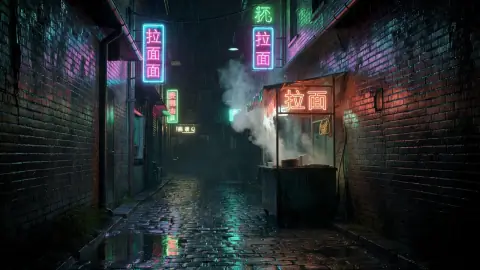
Attach two images and choose First & last frame. The model works out the motion that carries one shot into the other.
Input

Result
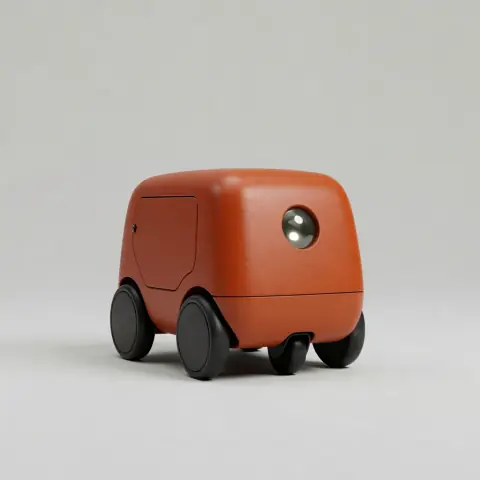
Give it a character, a product or a place and write the scene. Call each picture @Image 1, @Image 2 and so on, in upload order.
Input
Result
Upload a short video, choose Use as reference, and say what should change. The camera path and timing carry over to the new subject.
Input
Result
Attach an mp3, wav or m4a of up to 15 seconds and call it @Audio 1. Characters can sway, walk or cut on its rhythm.
Input
Result
Upload a clip of up to 15 seconds, keep Edit selected and describe the change: season, time of day, style or wardrobe. Subject and camera move stay put.
Input
Result
Put it to work
Each clip here came from the prompt behind its button. Load it, swap in your subject, and render your own take.
Show a director, a client or a producer the feeling you are after before a single day of shooting. Wide 21:9 frames and a soundtrack make it read like a scene.
Describe the material, the surface and every cut. Mini handles macro push-ins and clean top-down shots, and the click of a lid lands in the audio.
Start from a character image and give them something to do. Feed several references when they need to meet a second character or a set.
Three steps
Subject, action, camera, sound. Add one image for the opening frame, two for start and end, more as references, or a clip and an audio file to follow.
4 to 15 seconds, 720p or 1080p, six aspect ratios from 21:9 to 9:16. The button shows the exact credits before anything is charged.
Finished clips land in your library with their soundtrack. Upload one again and choose Edit to change the weather, the style or the subject.
On Seedance21
Seedance 2.0 Mini is the faster, cheaper member of ByteDance's Seedance 2.0 family. Seedance21 wires all four of its turbo endpoints to a single prompt box and picks one from what you attach.
16 credits a second at 720p, 20 at 1080p, any length from 4 to 15 seconds. Reference clips and edits add a smaller charge for the seconds they read.
Every clip comes back with an audio track. Name the ambience, the music or the footsteps in your prompt. When you edit a clip, switching sound off keeps your original audio.
Write "cut to" between shots and the model cuts, keeping the character and the light consistent. Good for a short sequence instead of a single moving photo.
Our server sets the price before a render starts. A run that fails or is refused hands every credit back to your balance automatically.
Use the free credits first. A plan makes sense once clips are a weekly habit.
Lite
For a few clips a month and trying ideas.
~$0.010 per credit
About $0.83 per clip
What you get
Pro
For creators and small teams posting every week.
~$0.008 per credit
About $0.66 per clip
Everything in Lite, plus
Ultra
For agencies rendering clips most days.
~$0.007 per credit
About $0.55 per clip
Everything in Pro, plus
Displayed prices already include applicable tax.
FAQ
Create an account, type the scene and press the button. Attachments decide the job: one image animates it, two can be first and last frame, more act as references, and a clip can be edited or followed. Results go to your library.
A video model from ByteDance, released in June 2026 as a lighter member of the Seedance 2.0 family. BytePlus put its price at about half of Seedance 2.0. It takes text, images, video and audio references and renders sound with the picture. Seedance21 runs it through WaveSpeed.
Seedance 2.0 Mini is the default: longer clips (4 to 15 s), 1080p, six shapes, audio and video references, and editing. Grok Imagine Video stays in the menu for its own look and its Extend option, which adds seconds to a clip.
Up to 9 images, 3 video clips and 3 audio files per run, the limits most API platforms list for Mini. Clips and audio may total 15 seconds each. Name them in the prompt as @Image 1, @Video 1, @Audio 1 in upload order. Photos of real faces may be rejected.
New accounts get enough credits for one 5-second 720p clip. After that, every render is paid with credits from a plan or a one-off pack.
Yes. Audio is rendered together with the picture, so ambience, music and effects you describe end up in the file. All of our test clips came back with a soundtrack. Listen before publishing, since results vary.
Yes. Upload a clip, keep Edit selected and write the change. Up to 15 seconds are read; longer files are trimmed. You pay for the seconds read plus the seconds produced.
16 credits a second at 720p and 20 at 1080p, so the default 5 seconds is 80 credits. With a reference clip or an edit, input and output seconds cost 7.5 credits each, plus 4 or 8 per output second. The button shows the total first.
Any whole number of seconds from 4 to 15, in 16:9, 9:16, 4:3, 3:4, 1:1 or 21:9. The model renders natively up to 720p; WaveSpeed's 1080p option adds an upscale step. Starting from an image or editing a clip, the output follows your input's shape.
That depends on ByteDance's and WaveSpeed's current terms, which we cannot settle for you. Read them before client work, and leave out real people's likenesses, other companies' brands and material you have no rights to.
No. Seedance21 is an independent website that calls Seedance 2.0 Mini through the third-party API platform WaveSpeed. ByteDance does not make, endorse or partner with it.
Your free credits cover one 5-second clip. Use them on a scene you actually need and judge the result.